
Zero-Risk Onboarding: SCEX Trading Simulator Registration and User Guide
As Vietnam’s regulated digital asset market pilot advances, the SCEX Trading Simulator—launched by Sacom Crypto Asset Exchange Joint Stock Company (SCEX)—continues to attract strong interest from domestic and regional investors. Designed as an educational companion tool under Vietnam’s “2026 Digital Asset Popularization Program” (Phổ cập Tài sản số 2026), the platform has drawn tens of thousands of registered testers since its debut, surpassing VND 55 trillion in cumulative simulated trading volume.
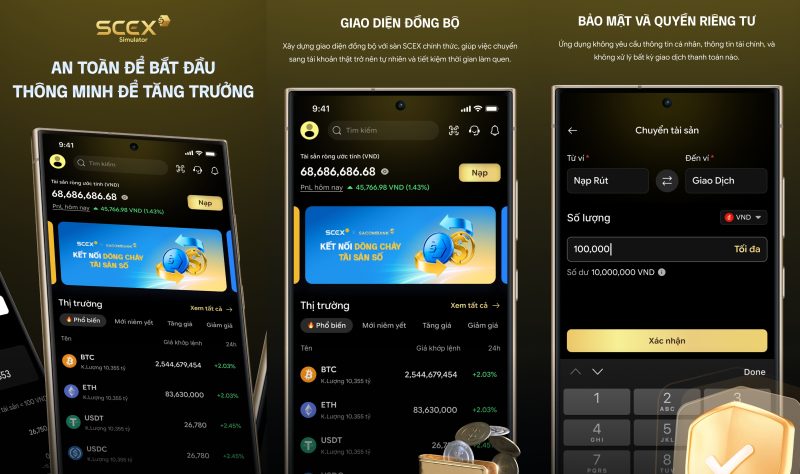
To help readers quickly familiarize themselves with compliant exchange order books and matching mechanics, below is an updated step-by-step registration guide and overview for the SCEX Trading Simulator.
1. Pre-Registration Overview & Key Platform Features
Built strictly as an educational and hands-on simulation environment, the SCEX Trading Simulator offers three core advantages:
-
Zero Financial Risk: All spot buy and sell exercises are executed using virtual funds. The platform involves no real-money fiat or cryptocurrency deposits and processes no financial transactions.
-
No Complex KYC Required: During the simulation phase, users are not asked to submit government IDs or sensitive banking information; accounts activate immediately using just an email address or phone number.
-
Cross-Platform Accessibility: Available via web portal (
trading.scex.com.vn) as well as official iOS and Android mobile apps listed under SCEX Trading Simulator by developer SACOM CRYPTO ASSET EXCHANGE JOINT STOCK COMPANY.
2. Four-Step Registration Guide for SCEX Trading Simulator
-
Download the Official App or Access the Web Portal Search for and install the official SCEX Trading Simulator application on the Apple App Store or Google Play Store. Users participating in the Digital Asset Popularization leaderboard campaign may also register initially via the campaign portal before syncing their login credentials in the app.
-
Submit Your Email or Phone Number Launch the app, tap Sign Up, enter a valid email address or mobile phone number, and create a strong login password.
-
Verify OTP for Instant Activation Enter the one-time password (OTP) sent via SMS or email to confirm your contact details. Once submitted, your account activates immediately without manual review delays.
-
Claim Virtual Funds and Start Practicing Upon logging into the trading dashboard, the system automatically credits your account with initial virtual capital. You can immediately monitor live market feeds, place limit and market orders, and track simulated profit-and-loss (PnL) metrics alongside order history in the portfolio tab.
3. Practical Tips & Compliance Disclaimers
-
Verify Official Channels: When downloading the mobile client, ensure the developer is listed as SACOM CRYPTO ASSET EXCHANGE JOINT STOCK COMPANY (Android package ID:
vn.com.scex.prod) to avoid counterfeit or phishing applications. -
Educational Scope Only: As stated in SCEX’s official app disclosures, the simulator is intended solely for practicing order execution and risk management. Simulated trading returns do not guarantee future live-market performance, and SCEX does not solicit or manage real-money investments through this application.(Vietnam Crypto Exchange)