
Detailed Steps for Changing Your Mobile Phone Number on TCEX
TCEX is a Vietnamese cryptocurrency exchange. According to the official TCEX guide, you can submit a change request directly through the TCEX App (or the associated TCInvest / Techcombank Mobile applications) on your phone after downloading and logging in. Below are the specific methods:
How to change your mobile phone number on TCEX: vietnam crypto exchange
Log in to the TCInvest app or visit the official website.
Enter “Account Settings” in the search box and select “Personal Information.”
Select “Request Change,” then choose the “Contact Information” section.
Case 1: The customer still has access to the mobile number registered with TCBS:
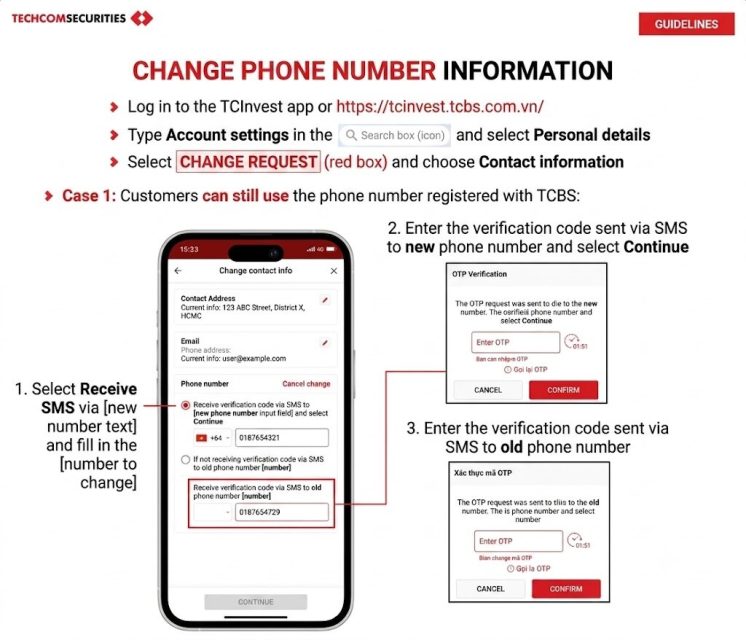
1. Select “Receive SMS sent to the old mobile number” and fill in the new mobile number you wish to change to.
On-screen option: Receive verification code via SMS to the new mobile number
2. Enter the SMS verification code sent to the new mobile number, then select “Continue.”
Popup title: OTP Verification
Message: A verification code has been sent to the new mobile number. Please enter the code and select Continue.
Input field: Enter OTP
Buttons: Cancel | Confirm
3. Enter the SMS verification code sent to the old mobile number.
Popup title: OTP Verification
Message: A verification code has been sent to the old mobile number.
Input field: Enter OTP
Buttons: Cancel | Confirm
Case 2: The customer no longer has access to the mobile number registered with TCBS:
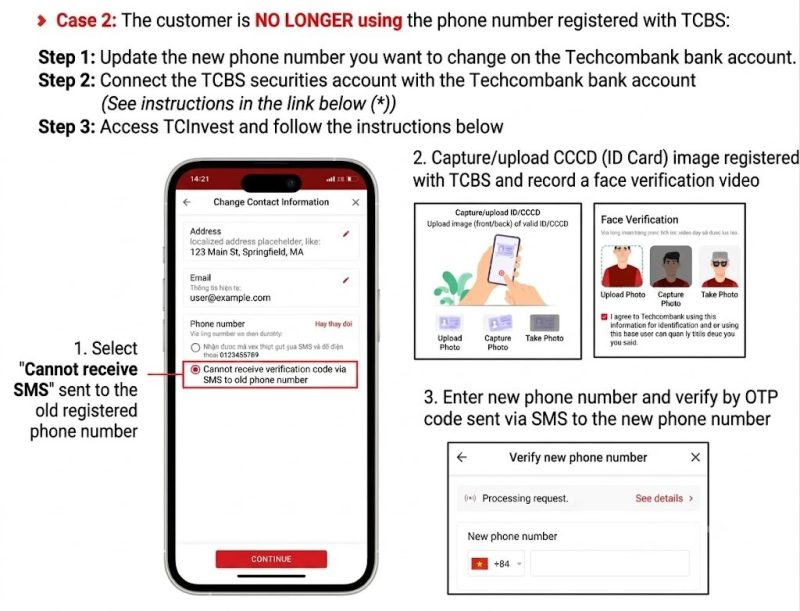
Step 1: Update your new mobile number on your Techcombank bank account.
Step 2: Link your TCBS securities account with your Techcombank bank account (see the instructions in the link (*) below).
Step 3: Access TCInvest and follow the instructions below:
1. Select “Unable to receive SMS” sent to the old registered mobile number.
On-screen option: Unable to receive verification code via SMS on the old mobile number
2. Take/upload an image of your CCCD (Citizen Identity Card) registered with TCBS and record a facial verification video.
Left box (Take/Upload ID/CCCD): Upload a valid ID/CCCD image (front/back)
Right box (Facial Verification):
Three icons below: Upload photo | Take photo | Take photo
Checkbox content: I agree to Techcombank using this information for identity verification…
3. Enter the new mobile number and verify it via the SMS verification code sent to the new number.
Popup title: Verify New Mobile Number
Message: Processing request. | View details >
Input field: New mobile number (with country code selection and input field)
Important Notes:
· The new mobile number registered with TCBS must be different from your already registered backup mobile number.
· If you have registered a backup mobile number and advanced security questions, you will need to verify them.
· After TCBS processes your request, the result of the information change will be sent via the “Notifications” section.
· If you are unable to make the change using either of the above two methods, please contact customer support via email at cskh@tcbs.com.vn for assistance.