TCEX Cryptocurrency Trading Order Placement Guide
The following is a step-by-step guide with images on the TCEX platform’s cryptocurrency order placement function, which we hope will be helpful for beginners.
Log in to the TCEX application or visit the website
In the application menu, go to the “Cryptocurrency Order Placement / Market Data / Assets” section.
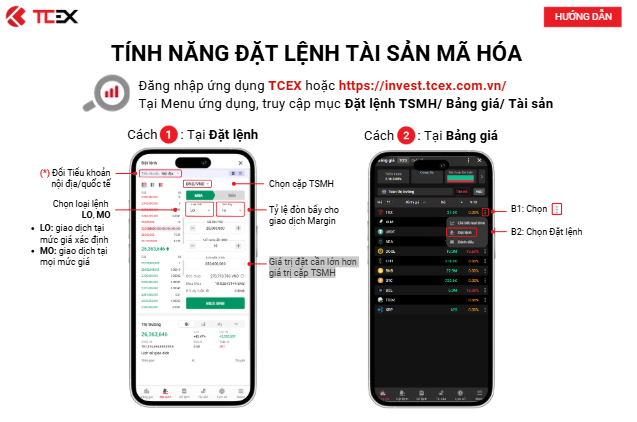
(Figure 1) Method 1: On the “Place Order” page
1. Switch between domestic/international sub-accounts
2. Select order type: Limit Order (LO), Market Order (MO)
LO (Limit Order): Trade at a specified price
MO (Market Order): Trade at any price
3. Select the cryptocurrency trading pair
4. Leverage ratio / Margin trading leverage (for Margin trading)
5. The order amount must be greater than the minimum trading amount for the cryptocurrency trading pair
(Figure 2) Method 2: On the “Market Data” page
Step 1: Select…
Step 2: Select “Place Order”
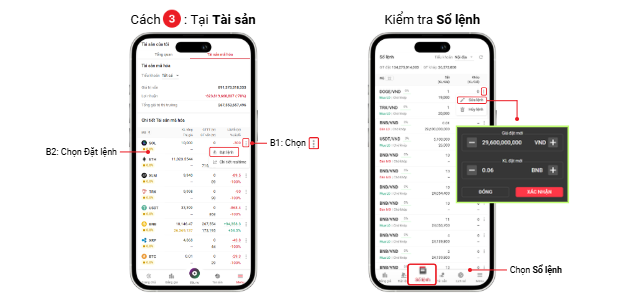
(Figure 3) Method 3: On the “Assets” page
Step 1: Select…
Step 2: Select “Place Order”
(Figure 4) Check/View Order List (View Order Book/Historical Orders)
Select “Order List” / “Order Book”
Vietnam crypto exchange (*) Trading Sub-Accounts:
-Domestic Sub-Account: A sub-account used to record the source of funds/assets from within China. Because the Vietnamese Dong (VND) originates from Vietnam, it is considered a domestic source of funds/assets.
Deposits (VND): Deposits to domestic sub-accounts are permitted only.
Fund and Crypto Asset (TSMH) Transfers Between Sub-Accounts: Transfers from international sub-accounts to domestic sub-accounts are permitted only.
-International Sub-Account: A sub-account used to record funds/assets originating from international sources. All types of crypto assets (TSMH) are considered international sources of funds/assets.