
TCEX Platform iOTP Setup and Usage Instructions
What is iOTP?
iOTP is a time- or algorithmically generated two-factor authentication (2FA) tool, similar to Google Authenticator or Authenticator software. It provides secondary security protection during high-risk operations such as logging in, withdrawing funds, and modifying security settings.
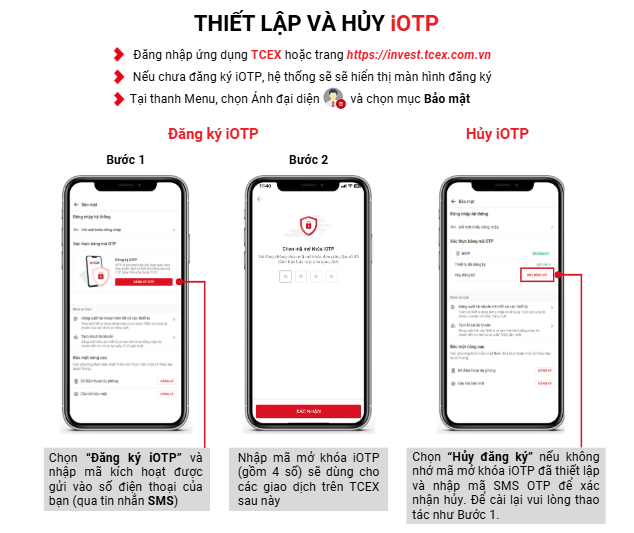
Vietnam crypto exchange TCEX iOTP Setup and Cancellation
1. Log in to the TCEX application or website.
2. If you haven’t registered for iOTP yet, the registration page will be displayed.
3. In the menu bar, click your profile picture and select the “Security” (Bảo mật) item.
Registering for iOTP
Step 1: Select “Register for iOTP” and enter the activation code sent to your mobile phone (via SMS).
Step 2: Enter the iOTP unlock code (4 digits), which will be used for subsequent transactions on TCEX.
Cancel iOTP Registration
If you forget your iOTP unlock code, please select “Cancel Registration” and enter the SMS OTP verification code to confirm the cancellation. To reinstall, please follow step 1.
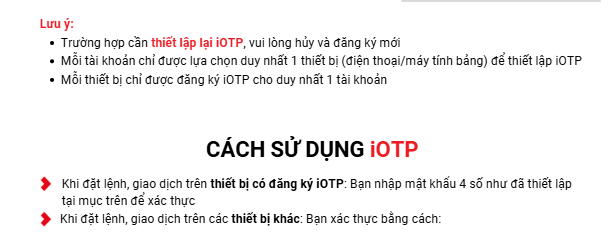
Notes and Usage Instructions
1. To reset your iOTP, please unbind the original account and re-register.
2. Each account can only select one device (phone/tablet) to set up iOTP.
3. Each device can only register one iOTP account.
iOTP Usage Instructions
· When placing orders or making transactions on a device with registered iOTP: Please enter the 4-digit password set above for identity verification.
· When placing orders or making transactions on other devices: You can verify using the following methods:
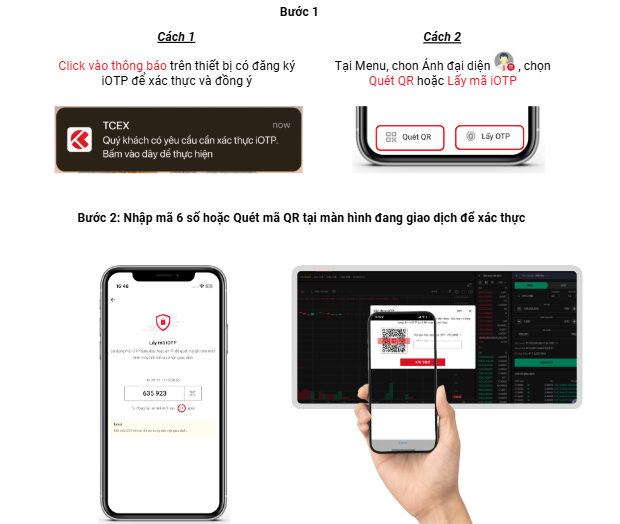
Specific Verification Steps
Step 1:
· Method 1: Click the notification on the device with registered iOTP to verify and agree.
(Pop-up notification: You have a request for iOTP verification. Click here to proceed.)
Method 2: In the menu, click your profile picture and select “Scan QR Code” or “Get iOTP Code”
Step 2: Enter the 6-digit verification code or scan the QR code on the transaction interface to complete the verification.