
TCEX’s Setup Method for Identity Verification via Fingerprint or Facial Recognition (FaceID)
TCEX exchange supports users in verifying their identity via fingerprint or facial recognition. The specific setup steps are as follows:
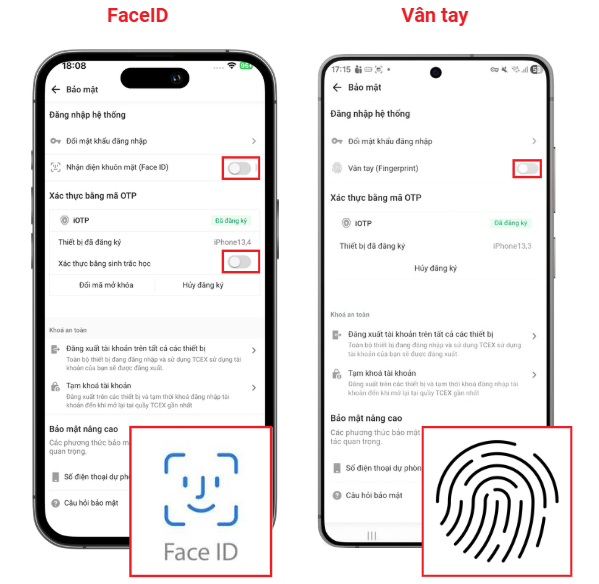
Steps to Set Up Identity Verification via Fingerprint or Facial Recognition (FaceID) on TCEX: Vietnam crypto exchange
Log in to the TCEX application or website.
In the menu bar, select “Personal Information,” then select “Security.”
Toggle the switch to enable or disable the feature. You will need to enter your password and iOTP verification code to complete the setup.
Note: Restoring factory settings, reinstalling the app, changing phone settings, or changing/clearing the lock screen password will disable FaceID/fingerprint recognition, and you will need to re-register.