
How to Check TCEX Exchange Historical Records
TCEX is Vietnam’s first cryptocurrency trading and custody platform, operating under a controlled pilot mechanism. The platform directly connects Vietnamese Dong (VND) funds with the security standards of international financial institutions. TCEX offers zero trading fees, allowing users to buy and sell directly in VND. There are no hidden fees and no conversion charges to USDT, maximizing user profits.
TCEX——Vietnam crypto exchange
TCEX Exchange Historical Records Query Guide (Fund Transaction Statement)
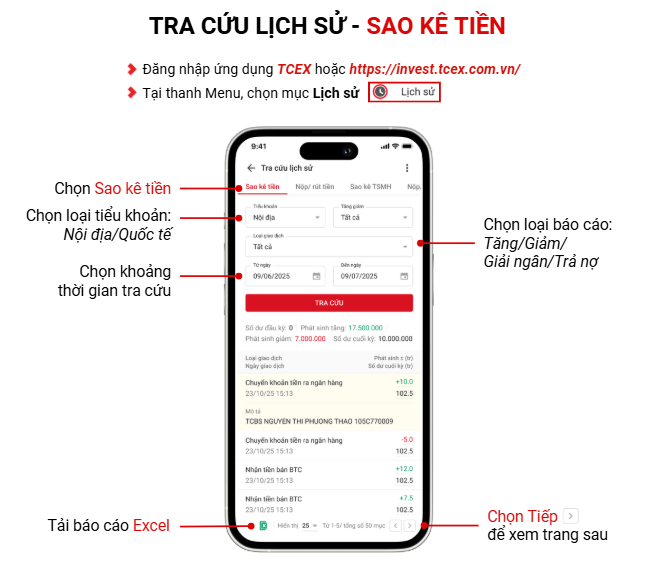
1. Log in to the TCEX app.
2. In the menu bar, select 【Historical Records】.
· Select “Fund Flow”
· Select sub-account type: Domestic / International
· Select report type: Increase / Decrease / Loan Disbursement / Loan Repayment
· Select the query time period
· Download Excel report
· Click 【Next >】 to view the next page
TCEX Exchange Historical Records Query Guide (Crypto Asset Trading History)
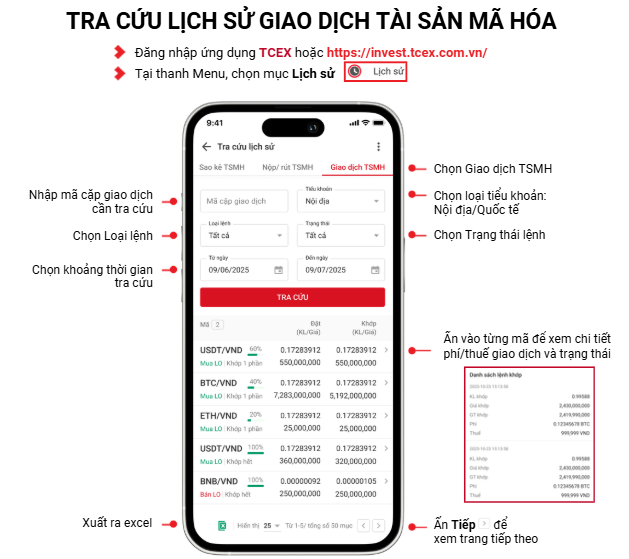
1. Log in to the TCEX app.
2. In the menu bar, select “Historical Records”.
· Select “Crypto Asset Trading” (Giao dịch TSMH)
· Enter the trading pair code you wish to query
· Select sub-account type: Domestic / International
· Select order type
· Select order status
· Select the time range for the query
· Click on each code to view specific trading fees/taxes and status
· Export as Excel file
· Click “Next >” to view the next page