
How to Change or Set a New Password on TCEX Exchange
Changing or setting a new password on TCEX Exchange is very simple. It is recommended to update your password regularly to enhance your account security level.vietnam crypto exchange
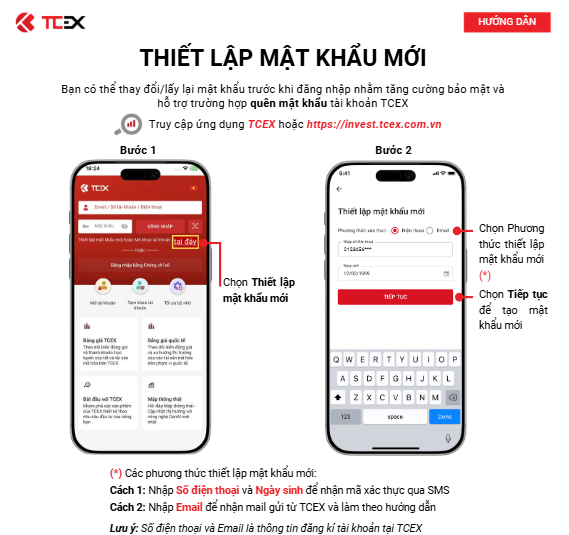
How to Change or Set a New Password on TCEX Exchange:
If you can currently log into your account normally and wish to change your password regularly to improve security:
1、Log into your account: Open the official TCEX website or App, and log in with your current username and password.
2、Go to Personal Center: Click on your personal avatar/profile icon in the top right corner of the page, then select [Account & Security] or [Security Center].
3、Locate Password Settings: Find the [Login Password] or [Change Password] option in the security settings list, and click [Modify] or [Set] next to it.
4、Verify Old Password & Enter New Password:
-Enter your current old password.
-Set a new password that meets security requirements (usually requiring a combination of uppercase letters, lowercase letters, numbers, and special characters).
5、Two-Factor Authentication (2FA): The system will send a verification code to your linked phone number, email, or Google Authenticator. Enter the correct code to confirm the action.
6、Complete the Change: Once submitted, the system will confirm the update was successful, and your old password will immediately become invalid.