How to Check Crypto Asset Information on TCEX
TCEX cryptocurrency exchange was established by Techcombank Vietnam. Vietnam crypto exchange TCEX has already received its first round of licenses for cryptocurrency exchanges in Vietnam, aiming to pilot the crypto asset market.
TCEX Trading Platform Crypto Asset Information Inquiry
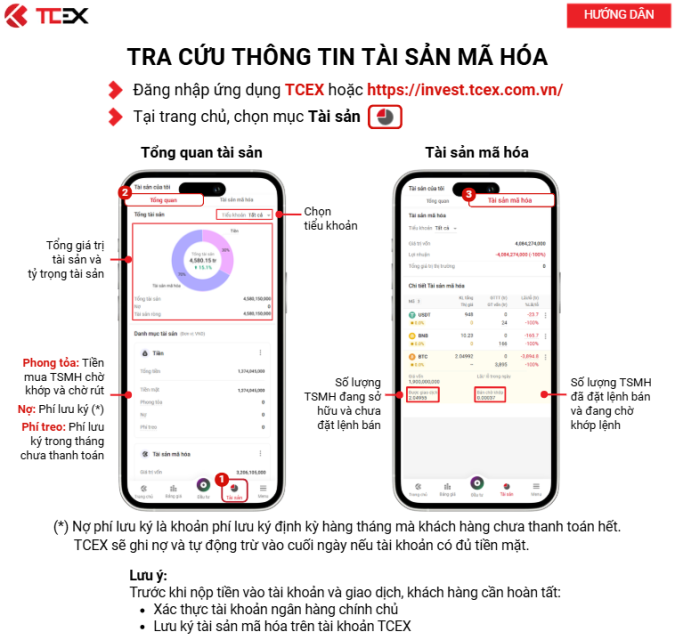
1. Log in to the TCEX application
2. On the homepage, select the “Assets” item [icon]
3. Asset Overview
4. Select Sub-Account
5. Total Asset Value and Asset Percentage
· Frozen: Funds used to purchase crypto assets awaiting matching and withdrawal
· Outstanding: Custody Fees (*)
· Pending Fees: Custody fees not yet paid this month
6. Crypto Assets
· Number of crypto assets owned but not yet listed for sale
· Number of crypto assets listed for sale and awaiting matching
Note:
(*) Outstanding custody fees are monthly custodian fees that the customer has not yet settled.
If the account has sufficient cash, TCEX will automatically deduct them at the end of the day.
Important Notes:
Before depositing funds and engaging in trading, customers need to complete the following:
1. Real-name bank account verification
2. Custody of crypto assets in a TCEX account