
TCEX Asset Inquiry and Transaction History Guide
In the process of crypto asset trading and investment, timely and accurate tracking of your asset distribution and status is an essential step for risk management and investment decision-making. As the Techcom Crypto Asset Exchange, TCEX provides investors with intuitive and secure asset inquiry features. This article outlines how to quickly check and manage your personal assets on the TCEX platform.
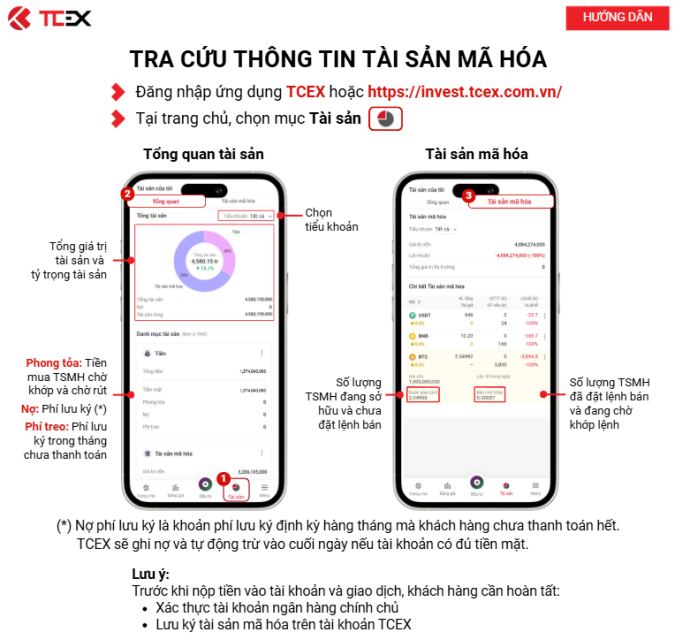
I. Logging In and Accessing the Asset Page
-
Account Login: Open the official TCEX website or mobile app, and log in using your registered credentials.
-
Security Verification: Complete two-factor authentication (such as iOTP, biometric/FaceID, or SMS verification code) based on your security settings to enter the main interface.
-
Locating the Feature: In the navigation menu or personal center, select the “Asset Inquiry” (Tra cứu thông tin tài sản) or “Asset Management” option.
II. Asset Overview and Categorized View
After entering the Asset Inquiry page, the system displays a complete overview of the assets in your account:
-
Total Asset Valuation The top of the page displays the real-time total value of your account assets, converted and presented in fiat currency (such as VND) and major crypto assets.
-
Sub-accounts and Categorized Assets
-
Spot/Trading Account: View the available digital asset balances directly used for placing trade orders, as well as frozen amounts.
-
Custody/Storage Account: View the asset amounts kept in secure custody.
-
Fiat Balance: Display the currently available fiat currency (VND) balance.
-
III. Transaction History and Detail Queries
If you need further details on fund movements, you can use the “History Inquiry” feature within the asset management interface:
-
Deposit and Withdrawal Records: View the status of crypto asset and fiat deposits or withdrawals, as well as on-chain hashes/transaction IDs.
-
Fund Transfer Records: Review the details of fund allocations and transfers between different sub-accounts.
-
Investment Performance Analysis: Use the “Investment Performance/Return Analysis” feature to intuitively understand profit and loss as well as asset growth across different stages.
IV. Security Tips and Precautions (Vietnam crypto exchange)
-
Account Security: To ensure the safety of your asset information and funds, it is recommended to enable iOTP or Fingerprint/FaceID.
-
Official Channel Verification: Always perform queries on the official TCEX website (
tcex.com.vn) or through the official app to protect against phishing websites and fraudulent applications. -
Data Synchronization: Brief delays may occur during on-chain deposits/withdrawals or trade settlements. If your asset data is not updated immediately, refresh the page or contact official customer support for assistance.