
TCEX Crypto Asset Deposit Guide
As the digital asset market continues to evolve, TCEX is committed to providing users with a compliant, secure, and stable asset trading and management experience. To help you smoothly complete the transfer and deposit of crypto assets, this guide outlines the detailed deposit process and key precautions for the TCEX platform.
1. Pre-Deposit Preparations
Before initiating any crypto asset deposit, please ensure you verify the following basic information to guarantee that your funds are transferred accurately and securely to your personal account:
-
Account Identity Verification and Security Settings: Ensure your TCEX account has completed the required identity verification (KYC) and security bindings (such as Two-Factor Authentication / 2FA).
-
Verify Deposit Coin and Network: TCEX supports specific blockchain mainnets or transport protocols (e.g., TRC-20, ERC-20) for different cryptocurrencies. The deposit network must strictly match the network selected on the platform you are withdrawing from.
2. Step-by-Step Deposit Guide
Follow these steps to transfer crypto assets into your TCEX account:
Step 1: Log in and Access the Deposit Portal
-
Log in to your official TCEX account.
-
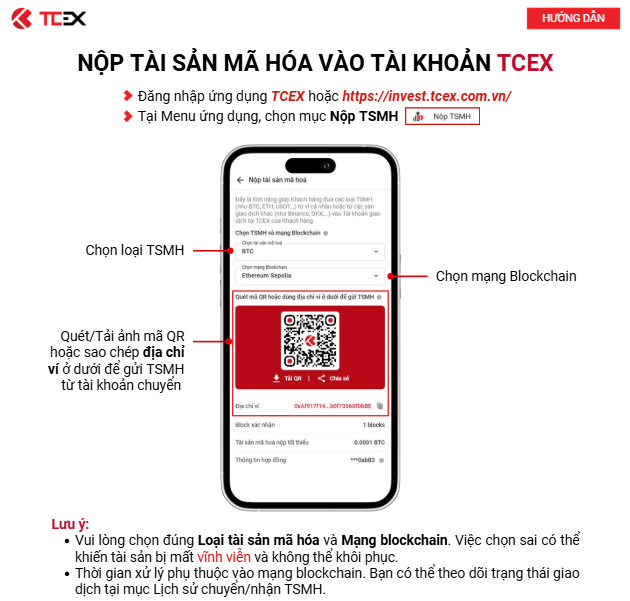
Go to the “Asset Management” or “Wallet” page, and click “Deposit” (Nộp tài sản mã hóa).
Step 2: Select the Target Crypto Asset and Network
-
Select the crypto asset you wish to deposit from the list (e.g., USDT, BTC, ETH).
-
Choose the corresponding transfer network according to your needs (e.g., USDT-TRC20 or USDT-ERC20).
Important Note: Do not perform cross-chain transfers or select mismatched networks; doing so may result in the permanent loss of your assets.
Step 3: Obtain and Copy the Deposit Address
-
The system will automatically generate a dedicated TCEX receiving address and a corresponding QR code for the selected asset and network.
-
Click “Copy Address” or scan the QR code using your withdrawal wallet/app.
-
If the asset requires a Memo or Tag (e.g., XRP, EOS), be sure to copy and paste the correct Tag value as well.
Step 4: Initiate the Withdrawal on the External Platform or Wallet
-
Open your external wallet or third-party exchange, and paste the TCEX receiving address (and Memo/Tag) you just copied.
-
Double-check that the coin, network, and address are correct, then submit the withdrawal request.
3. Deposit Crediting and Network Confirmations
-
Blockchain Network Confirmation: Once a deposit is initiated, the funds require node confirmations on the blockchain network. The required number of confirmations varies depending on the coin and network.
-
Status Query: You can track your deposit progress in real time under the TCEX Asset History section. Once the required number of network confirmations is reached, the assets will automatically be credited to your available balance.
4. Security Precautions and Risk Warnings
-
Address and Network Verification: Do not send non-corresponding cryptocurrencies to a deposit address. For example, depositing ETH to a BTC address will result in unrecoverable asset loss.
-
Missing Memo/Tag: For cryptocurrencies that require a Memo or Tag, failing to include it or entering an incorrect value will prevent the deposit from crediting automatically, requiring manual support processing.
-
Minimum Deposit Amount: Please pay attention to the platform’s minimum deposit threshold per transaction. Deposits below the minimum limit cannot be credited to your account.
-
Verify Official Channels: Always conduct operations through the official TCEX(Vietnam crypto exchange) website or official mobile application to protect yourself against phishing websites and fraudulent schemes.